How many AI announcements have you sat through this year that did not change a single thing about how your customers work on a Monday morning? I stopped counting mine somewhere around June.
Paris was different. Most of what Microsoft talked about at Directions EMEA 2026 had a date, a status and something I could actually go and try, rather than a vision slide and a promise. I came away with a notebook full of follow-ups, and a handful of things that I think will change how we work with customers over the next year.
Copilot can finally change things
The headline for me is that Copilot in Business Central can now edit data. The new Copilot experience that arrived with version 29 could already read your data, summarise it and help you think something through, but the moment you asked it to move a date on a sales order it politely declined. With Edit with Copilot it can create, edit and delete records, run actions and move around the Business Central UI the way a user would, and it does all of that as the signed-in user, inside that user’s permissions.
It is in early access preview for partners right now, on partner sandboxes in the US, the UK and Germany only, so nobody in our part of the world is switching it on for a customer next week. Microsoft is aiming for public preview in April 2027. That gives partners around five months to learn how it behaves with their own extensions before customers start asking about it, and I would use every one of them.
Alongside it comes business skills. These are plain-language documents inside Business Central that tell Copilot and the agents how a particular business does things, from its terminology to its rules to the small exceptions that usually live in one person’s head. Partners get early access in the next few weeks, and I would start writing skills for customers’ processes now rather than waiting for it.
The Expense Agent is the one customers will feel first
If I had to pick the announcement customers will notice soonest, it is the Expense Agent. It is now available in every country where Business Central is offered, with a mobile app for iOS and Android, and the Microsoft 365 roadmap fills in the rest over the coming months. Expense reports created straight from an approved travel requisition are listed for November, credit card feeds and an Expense Manager role centre for December, and withholding tax on expenses for April 2027.
What impressed me most was not the receipt capture, although it is very good. It was the policies. You write the company’s expense rules in plain language, something as simple as “hotel minibar purchases are not eligible for reimbursement”, and the agent checks every claim against them before it is submitted and flags it again for the approver. Every finance manager I know has a list of rules like that sitting in a Word document that nobody opens, and this is the first time I have seen a sensible home for them.
The receipts are read by the model itself, with no separate OCR service sitting behind it. Anyone who has maintained an expense integration over the years will understand why that made me smile.
The agents we already had got better
The Sales Order Agent and the Payables Agent both moved forward quietly. You can now run more than one Sales Order Agent in a single company, purchase order matching for the Payables Agent is generally available, and support for vendor credit notes is on the roadmap for November. Credit notes were the gap I heard about most from customers, so I am glad to see that one closing.
The story that stayed with me was Stödebröd, a family bakery in Sweden, who shared that the Payables Agent has reduced their administration by around 30 percent. For a business that size that is real time back every single week.
Smaller changes that will matter on real projects
A few of the less glamorous announcements are the ones I expect to use most. Master data management now works across environments, not only across companies inside one environment. Microsoft announced and showed it. It was awesome!
Report themes are generally available, which means you can now give Word report layouts different headers, footers and branding and set it once from Company Information. Shopify B2B companies, catalogues and pricing are generally available too.
The partner programme, briefly
The Business Central migration voucher continues in FY27 for deals above $25,000 in annual contract value, up to $100,000. It can now be combined with the Bridge to Cloud 3 promotion for Copilot Advantage when the customer buys Microsoft 365 Copilot for their Business Central users, and competitive takeouts have moved to a separate incentive of their own. Incentives change every year, so check the current terms with your partner contacts before you put a number in front of a customer.
Agents are not integration
I also had my own session in Paris, on a topic I think is getting lost in all the excitement about agents. Integration. With everything an agent can now do, it is tempting to believe it can also be the thing that brings orders in from the webstore, sends despatches to the warehouse and takes payment files back from the bank. It cannot, or at least it should not.
An agent is very good at a judgment call on a handful of records. An enterprise integration is the opposite job: thousands of messages a day that each have to arrive exactly once, in the right order, with a record of what was sent and a safe way to try again when the other side was down. Nobody wants a model deciding, creatively, whether a payment file has already been processed.
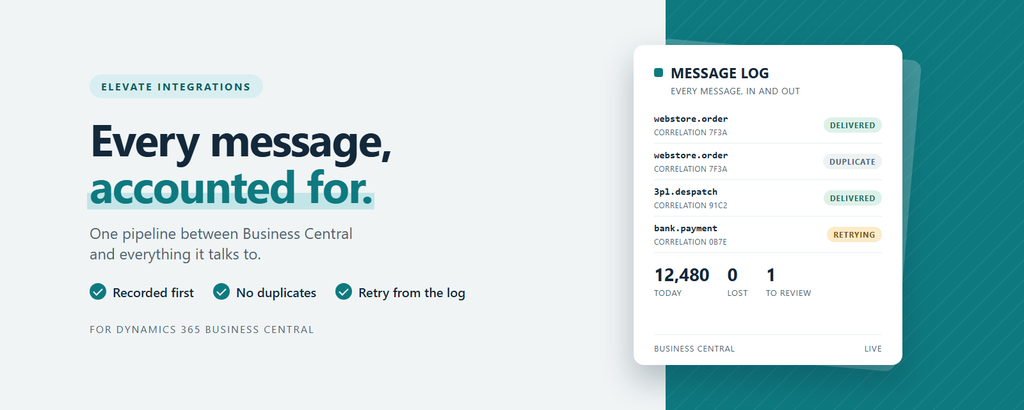
So I shared the message and integration patterns we use at Equerra, which honestly is most of what I have been building for the last ten to twelve years. Write every message down before you touch it, check it is not a repeat delivery, give each one a correlation id you can follow from end to end, and let failures land somewhere an operations person can fix the cause and retry without raising a ticket. Inside Business Central that is Elevate Connect, one pipeline for every message the ERP exchanges with the outside world. When the volume or the number of systems outgrows that, it is Elevate Integrations, our middleware that runs in the customer’s own Azure subscription with one message envelope, Service Bus routing with duplicate detection and dead-letter queues, and one place to monitor all of it.
The point I wanted partners to leave with was not about our tools, though. In the AI era, the first question in any integration conversation is which part of the work needs judgment and which part needs guarantees. Give the guarantees to a pipeline built for them, and put the agents on top of it, reading the message log, explaining why something failed overnight and proposing the fix for a person to approve. Thank you to everyone who came along and stayed back with questions afterwards.
Ticking things off in the keynote
Here is the part that made me smile the most. Sitting in that room, I found myself quietly ticking things off, because a lot of what Microsoft was proposing to partners is the way we already work at Equerra. It is a rare and very good feeling to watch the future being presented on a big screen and realise you have been living in it for months.
Microsoft talked about Dynamics 365 becoming headless business services that agents can call, and we have already started our own headless ERP journey with customers. The ERP stays the system of record, with its posting rules, approvals and audit untouched, and the apps, portals and agents people actually use sit outside it on one governed foundation. That foundation is our Frontier platform and the EQ portals built on it, where sign-in, permissions and audit are shared by the pages, the APIs and the AI agents alike, and every portal exposes MCP endpoints from the start.
The piece of that I am very excited about is Elevate Solution Builder. It is one Business Central app that sits as a thin layer between Business Central and any MCP client or agent that wants to work with it, so every AI tool comes in through the same door instead of each one finding its own way in. Behind that door an administrator decides which tables and operations are open at all, every call runs with the caller’s own permissions, and every write is checked against a policy and recorded. Solution Builder is how we let agents reach the customer’s data and action on it without handing out a key to everything.
Microsoft talked about Copilot acting as the signed-in user, inside that user’s permissions, and leaving a trail behind it. That is exactly the rule our agents follow: they act as the person asking, they propose, a person confirms anything that matters, and the ERP still validates everything. Microsoft talked about business skills, and our own delivery work has run on skills since May.
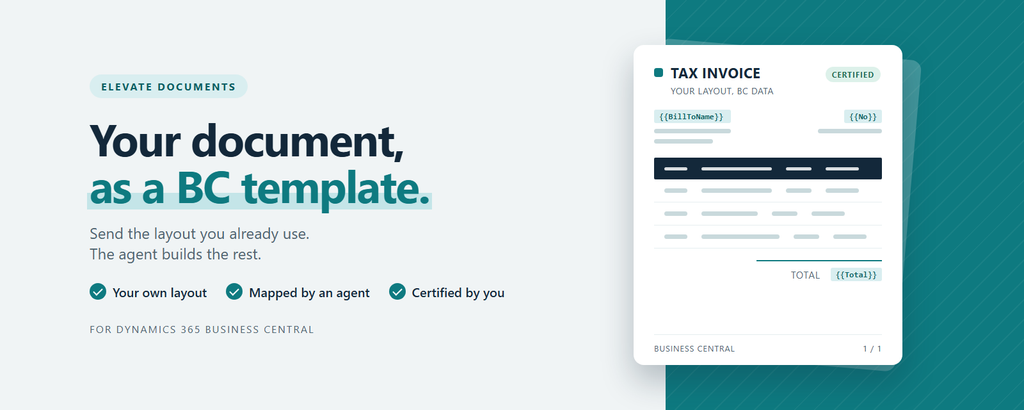
Elevate Documents is a small example of the same rule. Any document a business already sends, an invoice, a statement or a remittance, becomes a Business Central document template without anyone adjusting field lengths or fighting with a report layout. An agent reads the sample, works out what every value on the page is, builds the Word layout and the field mapping, and checks that nothing would print literally on a customer’s invoice. The template then arrives as a draft that can preview but cannot print or email until a person has compared it with a real document and certified it. The agent does the hard yards, and a person still says yes.
Microsoft also asked partners to move up the value stack and help customers build with AI themselves. That is what we have been doing through Frontier, giving a customer’s own team a safe way to build apps and tools with AI on top of their ERP rather than around it, with the development work held to the same quality gates we use on our own code.
Walking out of a keynote knowing that the direction Microsoft just described is already the ground you are standing on is a very good way to start a week.
What I took away
The first thing is how much of the market is still out there. Microsoft’s working estimate is around 10 million organisations with the scale and complexity for Business Central, against roughly 55,000 running it today, which is just over half a percent. Add the estimated 60,000 customers still on premises, and the fact that only about 5 percent of Microsoft 365 customers in market run Business Central, and it is very hard to see this as a crowded market.
The second is that customers do not know what they already have. One story was about a business that paid students for two months to key sustainability data into Excel, while the module to do it was already sitting in their Business Central. Another customer found the Payables Agent by themselves before their partner had ever shown it to them. Microsoft shipped more than 160 features in the last twelve months, and walking customers through what is already in the box might be the most useful work a partner does this year.
The third is the one I keep coming back to. Microsoft quoted McKinsey’s State of AI in 2026, where nine in ten organisations use AI somewhere but only around 6 percent say it has contributed real profit. What separates that 6 percent is not a better model or a bigger budget. They redesigned the work, and that is a conversation partners are well placed to lead if we are willing to have it.
Thank you
Thank you to the Directions EMEA team for another great event, and to the Business Central team at Microsoft for being so clear about what is shipping and what is still preview. That honesty makes our job a lot easier when we sit down with customers.
If you were in Paris, I would love to hear what stayed with you. If you were not, start blocking out the calendar for next year.
See you at the next one.
Regards,
Tharanga.