
Over ten years of experience in developing and implementing software solutions within the banking, tourism, manufacturing, education and retail sectors. Proven success of technical and functional skills in Technical Solution Development, Technical Consultation, Business Process Analyst, Process Re-Engineering, Solution Design, Project Management, Research & ERP Implementations. Managed and participated in over 40+ successful ERP (Microsoft Dynamics NAV) implementations during the past 10+ years while building relationships and exceeding client and management expectations. Possess a strong ability to turn around at-risk projects and deliver unique results. Recognize the value of being friendly, calm and helpful when interacting with people in all areas of life and always willing to learn new skills to build on strengths and learn from experiences. Active member and a community moderator of the official Microsoft Dynamics NAV Community forum and regularly share knowledge with others through personal Dynamics NAV Blog, user groups and webinars. Strongly believes that "one small piece of knowledge someone shares today could be the cornerstone of a huge concept that changes the world tomorrow". Recognized as a Microsoft MVP (Most Valuable Professional) for the years 2016, 2017, 2018 and 2019. It is the only Dynamics NAV MVP in New Zealand and Sri Lanka. Specialities: » Development Languages: AL, C/AL, » ERP: Microsoft Dynamics NAV 5.0 to Business Central » Databases: MS SQL » Other: SANA, LS Retail

Tharanga Chandrasekara
Author's posts
Apr 09
Implicit Conversion Between Record and RecordRef
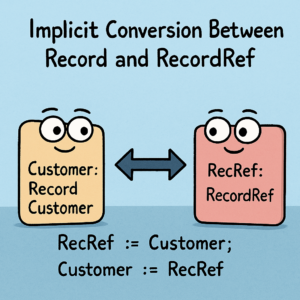
With recent updates to the AL language extension (v15), Microsoft has introduced support for implicit conversion between Record and RecordRef instances, making it easier to work with both types in the code.
This feature removes some of the verbosity previously required when switching between Record and RecordRef variables, allowing developers to write cleaner, more concise AL code.
Mar 17
Ternary operator ?: in AL
AL language now supports ternary (conditional) operator. The ternary operator? : known from other programming languages, streamlines conditional operations in code, enhances readability and reduces verbosity. The following examples show how the code GetBooleanText() can be rewritten using the ternary operator to be less verbose and more succint. Without the ternary operator: With the ternary operator …
Mar 13
Include Resources in extensions
Good news! Resource files can now be included as part of an extension. This new option enables developers to package essential resources, such as images, configuration settings, and text files, directly with their extensions, ensuring that all necessary components are readily accessible and improving overall performance. To add resources to the extension, the following property …
Mar 11
AL now supports the Continue statement
From runtime version 15, it is possible to use the continue keyword in loops to continue to the next iteration. (Please make sure that your “AL Language extension for Microsoft Dynamics 365 Business Central” is version 15.0 or above) The continue statement allows skipping the remaining code in a loop’s current iteration and jumping directly into the …
Mar 11
Multiline strings: AL now has support for multiline string literals.

AL now support multiline string literals. It will enhance code readability and maintainability, especially when dealing with lengthy text content or complex string literals. Functionality is available with the AL Language Extension version 15.0 I thought, “Oh, we can use this to store the prompts for Copilot or OpenAI.” However, Dmitry suggested that utilising the …
Mar 11
Do you know you can navigate directly to a symbol of a file in VS Code?
All you need to do is press “Ctrl” + P and type the object name you want to navigate to. Then press @. It will list all the object’s fields, functions, and triggers. You can select the place you want to jump into. Regards,Tharanga Chandrasekara
Mar 11
How to Enable Outbound HTTP Requests in the Sandbox
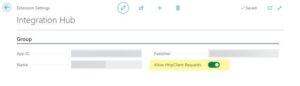
Did you know that outgoing HTTP requests are automatically disabled when a Business Central sandbox is created to prevent unintended calls? To enable outgoing HTTP requests in a sandbox environment, follow these steps:1. Go to the Extension Management page.2. Select the extension making the HTTP request.3. Enable the “Allow HttpClient Requests” option in the extension’s …
Mar 11
Do you specify the 𝐑𝐮𝐧𝐓𝐫𝐢𝐠𝐠𝐞𝐫 parameter?
When you call the Insert, Modify, or Delete functions, it is important to specify the 𝐑𝐮𝐧𝐓𝐫𝐢𝐠𝐠𝐞𝐫 parameter. If you do not include this parameter, the compiler assumes you 𝒅𝒐 𝒏𝒐𝒕 𝒘𝒂𝒏𝒕 to run the trigger. 𝑨𝒍𝒘𝒂𝒚𝒔 𝒃𝒆 𝒄𝒍𝒆𝒂𝒓 𝒂𝒃𝒐𝒖𝒕 𝒚𝒐𝒖𝒓 𝒊𝒏𝒕𝒆𝒏𝒕𝒊𝒐𝒏𝒔. For example:If you do not want to run the trigger, use:Record.Modify(𝐟𝐚𝐥𝐬𝐞); Avoid using:Record.Modify(); If …
Feb 02
Are you looking for an Action image browser in BC?
AL developers for Microsoft Business Central need to browse the Business Central image gallery to select meaningful images. This allows them to assign these images to new action buttons, enhancing the user interface for better usability. The AZ AL Dev Tools extension simplifies this process by adding new commands that load and display available images …
Feb 02
Update sandbox environments to preview versions

It will be possible to update a Microsoft Business Central sandbox environment to the preview version starting with the public preview for 2025 release wave 2.