-
 API, Azure Integration Services, Development, Microsoft Dynamics 365, Microsoft Dynamics Business Central, Tips and Tricks, Web Service
OAuth – Part 02 – Configure Service to Service Authentication
In this blog post, I’m going to take you through the steps required to complete the OAuth client credentials flow for Business Central. Check this link if you want to refer to the official post from Microsoft.
-
 AL Extensions, Development, Microsoft Dynamics 365, Microsoft Dynamics Business Central, Tips and Tricks, VSCode
How to get Business Central Environment Related Attributes?
If you want to get the details about the environment you don’t have to reinvent the wheel, you can simply use the standard codeunit Microsoft has introduced. If you look into the codeunit 457 “Environment Information”, you will see there are many procedures that fetch attributes concerning the environment of the service on which the…
-

TableType Property = Temporary
A temporary table is a temporary variable that holds a table. A temporary table is used as a buffer or intermediate storage for table data. You can use a temporary table just like you use a database table. The differences between a temporary table and a database table are as follows: A temporary table data…
-
 Dataverse, Integration, Microsoft Dynamics 365, Microsoft Dynamics Business Central, Tips and Tricks, Uncategorized
Lesson learned during Dataverse integration: Namemapping = ‘Logical’ was not found in the MetadataCache.
Yesterday I was working on integrating a custom entity using the box connector for Dataverse in Microsoft Dynamics 365 Business Central. After completing all the changes and deploying the app to a sandbox environment, I tried to open the custom entity table through its list page. Unexpectedly I ran into below dialogue box. The entity…
-
AL Extensions, Development, Microsoft Dynamics 365, Microsoft Dynamics Business Central, Tips and Tricks, VSCode
Quick fix for warning AL0604: Use of implicit ‘with’ will be removed in the future.
If you have not read my previous blog posts about the Implicit WITH, I suggest you read them to get a better understanding of the Implicit WITH. Also, you can read the Microsoft Docs to get more information as well. NoImplicitWith – The name #FieldName does not exist in the current context NoImplicitWith: The type…
-
AL Extensions, Development, Microsoft Dynamics 365, Microsoft Dynamics Business Central, Tips and Tricks
NoImplicitWith: The type or method ‘Copy’ cannot be used for ‘Extension’ development.
If you have not read my previous blog, I suggest you read it to get a better understanding of NoImplicitWith. Microsoft recently announced about obsoleting the WITH statement and if your app.json file contains NoImplicitWith as a feature then you will probably be getting below error. The type or method ‘Copy’ cannot be used for…
-
AL Extensions, Development, Microsoft Dynamics 365, Microsoft Dynamics Business Central, Tips and Tricks
NoImplicitWith – The name #FieldName does not exist in the current context
If you have used WITH statement in your AL code to make the code readable, then this blog will be helpful for you. There are people who completely support the use of WITH statement and I also was on that category a few years ago. Fortunately, I moved on from the use of WITH statements.…
-
AppSource is embedded in Business Central
With the Business Central version 16.5, AppSource is now embedded within the Business Central. No more required to navigate to a different browser window to select the extensions to install. The view is already been filtered to Business Central apps and experience is seamless. Please provide your feedback with a comment. Thank you and Regards,Tharanga Chandrasekara
-
HTTP GET Request in Azure Logic Apps
It is by default when Logic Apps exposes an HTTP Trigger Request, it uses an HTTP POST method. Recently one of my colleague asked is it possible to change the trigger Method to GET. Yes, this is very much possible. When the Logic Apps was initially released it was only able to support the POST…
-
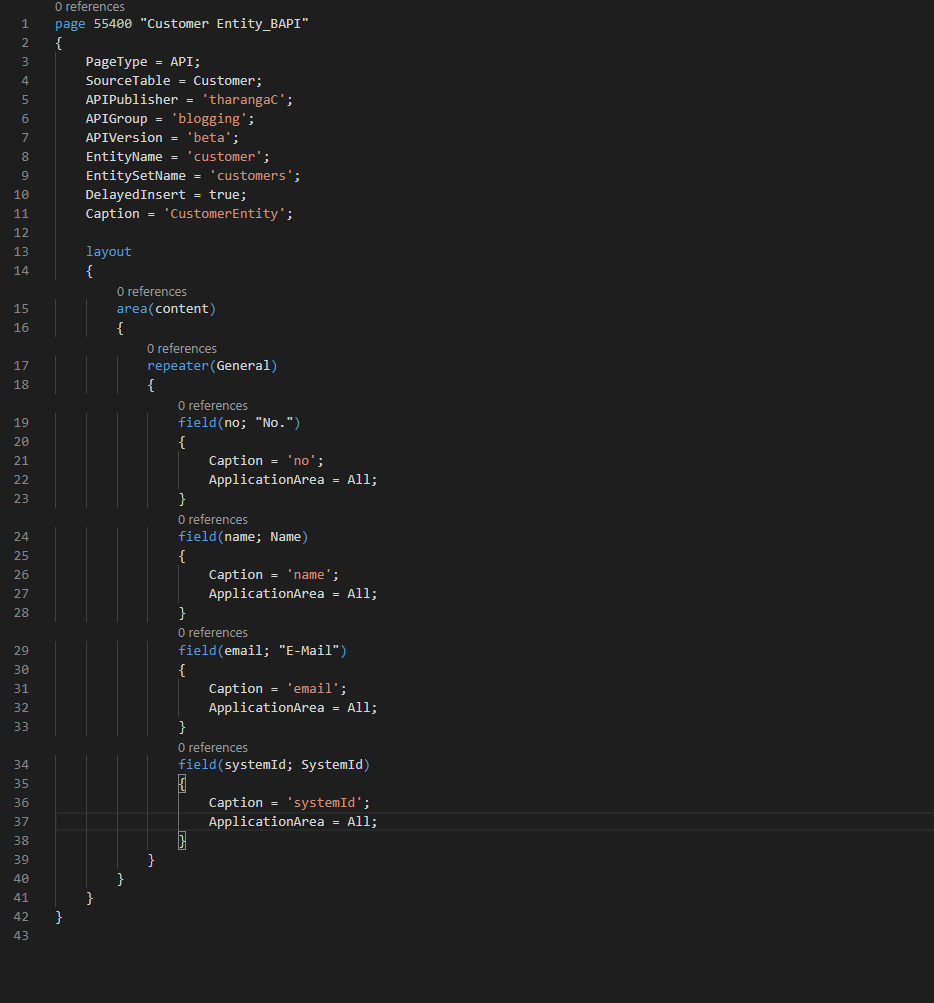
How to use a custom SystemId when inserting a record through an API
Have you tried to insert a record to Microsoft Dynamics 365 Business Central through a Custom API and pass a custom SystemId with the record? Basically what I trying to achieve is when an Account is created in the D365 Sales system, I want to pass that record to D365 Business Central. I can easily…
-

Navigate directly to a symbol of a file in VS Code
How would feel about if you can directly navigate to a symbol of a file? It is now possible in VS Code. All you need to do is press “Ctrl” + P and type the object name you want to navigate to and then press @, it will list down all the fields, functions and…
-
Object types is case sensitive in TenantWebServiceCollection
Last week while I was working on an integration project, I wanted to call a Business Central function from Azure Logic Apps. I had few options with APIs but I went ahead with creating a CodeUnit with a function and expose it as a web service. Rather than exposing the CodeUnit by manually inserting…
-
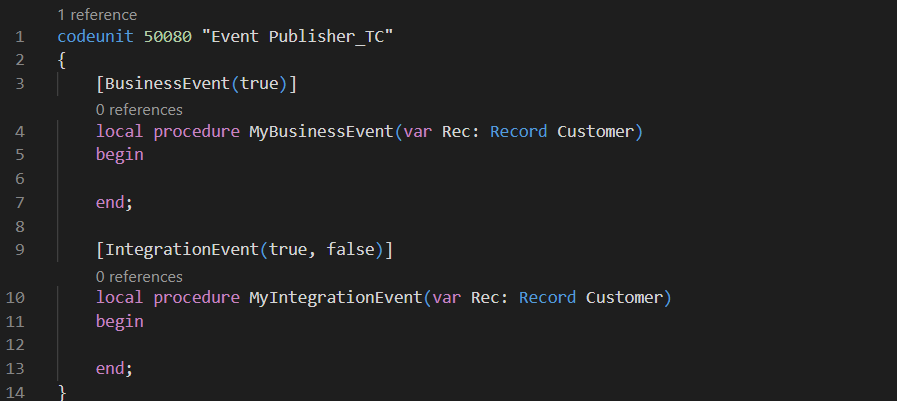
Obsoleting Microsoft Dynamics 365 Business Central Events
If you are working on the extension development, then I’m sure that you already have published and subscribed to many events. There are some rules that you should strictly follow around events if your extension is eventually be used by another partner to build their solution on top of yours. Business Central has two types of events…
-

Microsoft Dynamics 365 Business Central Wave 1 2020: Release note explained.
A few weeks ago Microsoft published the 2020 release wave 1 plan for Dynamics 365 and Microsoft Power Platform document. This document contains details about many new interesting functionalities and features. Below are some of the features that got my attention. Look up events and insert event subscribers in code One challenge most developers face…
-

Notes from Directions EMEA 2019
Below are some notes I took during Directions EMEA 2019. A bit late to publish but didn’t want to just delete them. Treat extensions as products. Which means releasing them to customers periodically. Allow proper testing with proper test cases (Preferably automated testing). Try to run all the customers on the same version. Proper code…
-

AL: Dependencies to System and Base Application
Another draft post that I forgot to publish. From version 15 onwards, Microsoft decided to split the entire application into 2 apps. System Application Base Application From going forward if you are developing an app on top of the Business Central, it must have a dependency on System Application and Base Application. This does not…
-
 AL Extensions, Development, Microsoft Dynamics 365, Microsoft Dynamics Business Central, Tips and Tricks
AL: Action Property must have a value
This blog post was sitting on my draft folder for the past few months and finally got time to hit the publish button. AL compiler getting smarter day by day. In previous versions even if we declare an action and never implement the OnAction trigger or assign the RunObject property it never gave a warning…
-
AL Extensions, Announcement, Conferences, Development, Microsoft Dynamics 365, Microsoft Dynamics Business Central
Report back from Directions EMEA 2019: Technical
The first-day keynote was packed with stats and exciting announcements from Microsoft. As for the Microsoft general manager Toby Bowers, 1400+ partners selling Business Central worldwide. 4000+ customers actively using Business Central. 450+ business central solutions are available on AppSource. The number of users doubled compared to last year. This clearly indicates that Business…
-
Report back from Directions EMEA 2019
Starting from the second week of July to today, I had a completely packed schedule. It is a simple explanation about me blogging about the Directions EMEA after two months. August month started with 4 different Dynamics 365 Saturday community events every weekend and then came the Directions EMEA, after a few weeks time NAV…
-
How to change the version of the AL Language compiler
Microsoft released a new update to AL Language extension for VS Code. With this new update, the compiler does a few pre-checks before compiling the objects and packages them into a .app file. Most probably you will have to do minor changes to your extension codebase to work with the new compiler. Otherwise, you will…
-
 AL Extensions, Development, Microsoft Dynamics 365, Microsoft Dynamics Business Central, Tips and Tricks, VSCode
Platform property is still required in app.json
With the Wave 2 release, Microsoft did convert all the C/AL objects into AL. Since they want to lead by example they wanted their own code to be on extensions as well. Plus they wanted to split the objects based on its functionality. After converting to AL, Microsoft put the objects into below two extensions: System…
-
 AL Extensions, Development, Microsoft Dynamics 365, Microsoft Dynamics Business Central, Tips and Tricks
How to handle breaking changes?
Wagner and I are on our way to Vienna to present at Directions EMEA, and now we got into our second flight after flying over 15000Km from Auckland New Zealand, to Dubai. We got another 6 hours to complete on this flight before we step our foot in Vienna. Went through the in-flight entertainment system,…
-

Directions EMEA 2019 : We safely landed in Vienna
We safely landed in Vienna after flying over more than 18000+ Km. This is just normal to most of us who live on the edge of the world. As our prime minister used says even the shortest flight to our neighbor is more than 4 hours away. So flying for more than 24 hours is quite common…
-
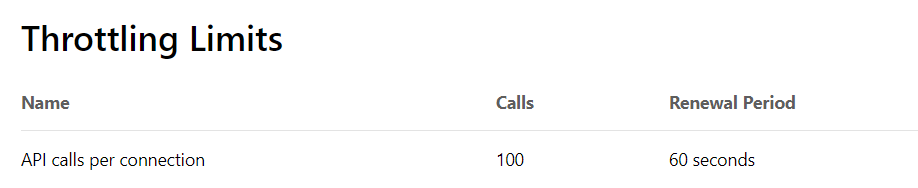
Too many requests reached
What is the maximum number of API requests Microsoft Dynamics 365 Business Central can handle within a one minute? Ran into this question a couple of months ago, specifically soon after the April release. Most of our Azure Logic Apps integrations to Microsoft Dynamics 365 Business Central started to fail due to API endpoint changes. …
-

PowerShell: Run Script Error: Exception setting “CursorPosition”
Last week I was working on a PS script to upload files to an FTP and this script supposes to runs through a windows service. It runs perfectly well when it runs manually with the PowerShell ISE. However, when I scheduled it to run it through a service, service logs below error in the error…
-
 AL Extensions, API, Development, Microsoft Dynamics 365, Microsoft Dynamics Business Central, Tips and Tricks
How to inject data to Customer Address Line 2 using Microsoft Business Central API
Creating a customer record in Microsoft Dynamics 365 Business Central is a topic I blogged about in one of my previous blog posts. If you have not read them yet I suggest you read it before going through this for better understanding. Part 01: Getting Started with Dynamics 365 Business Central APIs Part 02: Understanding Microsoft Business…
-
Understanding Microsoft Business Central Custom API Endpoints
This is the third blog post about the Microsoft Business Central APIs and I suggest you go through below blog posts first if you haven’t read them yet. Part 01: Getting Started with Dynamics 365 Business Central APIs Part 02: Understanding Microsoft Business Central Out-Of-The-Box API Endpoints If you want to access custom developed API then this blog…
-
Understanding Microsoft Business Central Out-Of-The-Box API Endpoints
If you are working on a project which involves integrating a third party application to Microsoft Dynamics 365 Business Central, then I assume you have already come across with the Business Central APIs. I noticed that most of the developers are still not comfortable with the endpoints of the BC APIs. Therefore this blog post…
-
Fourth consecutive year as a Microsoft Most Valuable Professional (MVP) – Business Applications
Honoured to receive my 4th consecutive MVP award for Business Applications. Congratulations to my fellow MVPs and best wishes to those boarding on a new journey. A special shout-out goes to my family, @ThetaNet, @MSDYN365BC, and @freddydk for all the support! Thank you, everyone, for helping me out on this great journey and…
-
Dynamics 365 Business Central: Permissions required to download AL symbols
Your user needs to have the necessary permission to download AL symbols from Visual Studio Code (VSCode), else you will end up with “Could not download symbols” error in VS Code. In order to download symbols, User needs to have SUPER permission or should have “D365 EXTENSION MGT” permission assigned. Symbols are stored per tenant…
-
How to check Microsoft Dynamics 365 Business Central tenant version
You can use the “System Information” page to check the current version of Microsoft Dynamics 365 Business Central tenant. Simply search for “System Information” using “Tell me what to do” and click on the “System Information” link in the result. “System information” page will show the current version of the tenant. Version get change every time Microsoft…
-
How to access action output in Logic Apps
If you are working on Logic App to integrate Microsoft Dynamics 365 Business Central with any other third party application, by now most probably you must have used HTTP requests or custom connectors (mainly with SOAP web services). I saw a couple questions in the forum asking how to access action output in Logic App. …
-
Azure Integration Services, Azure Logic Apps, Development, Microsoft Dynamics 365, Microsoft Dynamics Business Central, Web Service
Call a Microsoft Dynamics 365 Business Central function through a Web Service : SOAPAction
Today I did some work with a Logic Apps and one of the requirement was to call a Business Central function through a Web Service. I normally use Postman to simulate requests, export the collection and use that to create the Logic App connector. Codeunit which I published as a web service had few functions…
-
Add a logo to a Microsoft Dynamics 365 Business Central Extension
I saw a couple of forum questions about how to add a logo to an AL Extension and I thought to share a quick guide on how to. If you publish your new extension to Microsoft Dynamics 365 Business Central and then navigate to Extension management page, you will see your new extension as below…
-
AL Extensions, Development, Microsoft Dynamics 365, Microsoft Dynamics Business Central, PowerShell, Tips and Tricks
Runtime Packages for Business Central On-Premises
Before you go through this blob, I suggest you read my blog post “Your program license does not allow you to publish” to get an understanding about the Runtime Packages. Runtime packages are designed to help the distribution of extensions. You can generate Runtime packages that do not contain AL code. Runtime packages allow protecting the…
-
AL Extensions, Development, Microsoft Dynamics 365, Microsoft Dynamics Business Central, Microsoft Dynamics NAV, PowerShell, Tips and Tricks
Your program license does not allow you to publish
We recently ran into a new issue when we try to push one of our extensions to Microsoft Dynamics NAV 2018 On-premise installations. We used PowerShell script to upload the extensions to production and we did this couple of days ago too without an issue. However this time we got the below error during the installation :…
-
Function Overloading in AL with Option and Integer
We never had the luxury of overloading a function in C/AL, but with the AL we have that ability. Which means you can use the same function name with different parameters. This blog post is about a small glitch in the function overloading in AL and I will write a separate blog post about function overloading and its implementations (Excited about…
-
Git Bash on Visual Studio Code integrated terminal
Visual Studio Code (VSCode) uses PowerShell by default in the integrated terminal. How easy would it be if Bash can be integrated into VS Code terminal? This is how my VS Code terminal looks like now: This can be achieved with a few steps. 1. Download Git (https://git-scm.com/downloads) and during the installation click below steps.…
-
The runtime version of the extension package is currently set to ‘2.1’
While deploying one of our base extensions to a customer tenant we got an error with “Unable to Install the Extension *******”. This was the same extension we deployed to the same tenant couple of days ago with a different version. We revert our changes and try to publish it again but the same error. …
-
Control Source code download from an AL Extension
Microsoft Dynamics 365 Business Central extensions now allow partners to decide if they want to share the extension source code with others or they want to go put it into a little black box. If the extension contains code related to specific customer requirements then I think it is up to the customer and to partner…
-
Get all Docker images available for Business Central
You can use below PowerShell script to get all the Docker images available for Business Central. This is very useful if you always work with Docker Containers and want to test your changes with different localizations and different builds. If you are still new to docker then its better to read my previous blog post…
-
Quick Fix : This AL extension version for Visual Studio Code cannot be used with the specified server.
If you recently pulled the latest Business Central image or update the visual studio code you might have already faced this error. This AL extension version for Visual Studio Code cannot be used with the specified server. Please update the AL extension from the Visual Studio Code marketplace. Additional information:Server details – Runtime: 2.3 –…